Toggle Side Panel

  • Home
  • Articles
    • All Articles
    • Blogs
    • Videos
    • Infographics
  • Consultants
    • Salesforce Product Expertise
      • Top Salesforce ConsultantsTop Salesforce Consultants
      • Marketing Cloud ConsultantsMarketing Cloud Consultants
      • Service Cloud ConsultantsService Cloud Consultants
      • Experience Cloud ConsultantsExperience Cloud Consultants
      • Analytics Cloud ConsultantsAnalytics Cloud Consultants
    • Salesforce Industry Expertise
      • Non-Profit Cloud ConsultantsNon-Profit Cloud Consultants
      • Financial Service Cloud ConsultantsFinancial Service Cloud Consultants
      • Health Cloud ConsultantsHealth Cloud Consultants
      • Commerce Cloud ConsultantsCommerce Cloud Consultants
      • Manufacturing Cloud ConsultantsManufacturing Cloud Consultants
    • Salesforce Experts by Location
      • USATop Salesforce Consultants in USA
      • IndiaTop Salesforce Consultants in India
      • AustraliaTop Salesforce Consultants in Australia
      • United KingdomTop Salesforce Consultants in UK
      • CanadaTop Salesforce Consultants in Canada
  • Webinars
  • Contact Us
  • Discussions
More options
    Sign in Sign up
    • Home
    • Articles
      • All Articles
      • Blogs
      • Videos
      • Infographics
    • Consultants
      • Salesforce Product Expertise
        • Top Salesforce ConsultantsTop Salesforce Consultants
        • Marketing Cloud ConsultantsMarketing Cloud Consultants
        • Service Cloud ConsultantsService Cloud Consultants
        • Experience Cloud ConsultantsExperience Cloud Consultants
        • Analytics Cloud ConsultantsAnalytics Cloud Consultants
      • Salesforce Industry Expertise
        • Non-Profit Cloud ConsultantsNon-Profit Cloud Consultants
        • Financial Service Cloud ConsultantsFinancial Service Cloud Consultants
        • Health Cloud ConsultantsHealth Cloud Consultants
        • Commerce Cloud ConsultantsCommerce Cloud Consultants
        • Manufacturing Cloud ConsultantsManufacturing Cloud Consultants
      • Salesforce Experts by Location
        • USATop Salesforce Consultants in USA
        • IndiaTop Salesforce Consultants in India
        • AustraliaTop Salesforce Consultants in Australia
        • United KingdomTop Salesforce Consultants in UK
        • CanadaTop Salesforce Consultants in Canada
    • Webinars
    • Contact Us
    • Discussions
    Close search
    financial service cloud

    What is Salesforce Financial Services?

    Stimulus Consulting Jul 24, 2020
    3,558  Views

    If you work in the financial sector and you like Salesforce as much as we do, it’s likely you’ve heard of the Financial Services Cloud. Even if you haven’t, this is still the blog for you!

    In this guide, I’m going to give you a run-through on exactly what the Financial Services Cloud is, and how you can expect to use it if you do ever implement it for your org. So, what is it – and why might you want to use it?

    Firstly, I’m going to be using the trial version of the Financial Services Cloud for this blog. If you’d like to give it a try, click on this link and follow the steps to get yourself set up. Salesforce recommends you use an email for this form that you’ve never used to sign into Salesforce with anywhere – so feel free to use a personal email address if you have one spare.

    dont miss out iconDon’t forget to check out: Email Studio in Salesforce Marketing Cloud | The Ultimate Guide
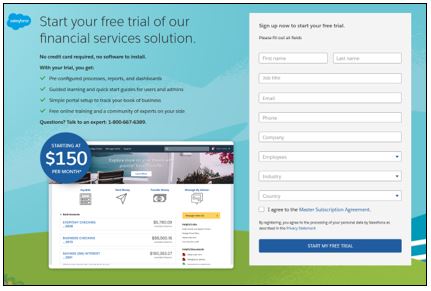
    Once you’re logged in, you’ll see a screen that looks like this:
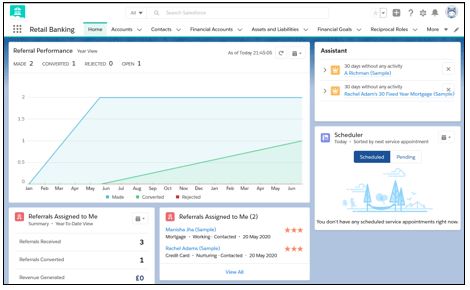
    Now, you may have noticed that the Home page for this “Retail Banking” app looks – on the face of it – very similar to what you might see when you log in to the default Home page of the Sales app in Sales Cloud. That’s because the Financial Services Cloud is Salesforce, and this is one of its main benefits.

    Put simply, because the Financial Services Cloud is built-in Salesforce, you get to enjoy the flexibility, power, and scalability of Salesforce along with a few extra tools. Let’s go through some of those tools now.
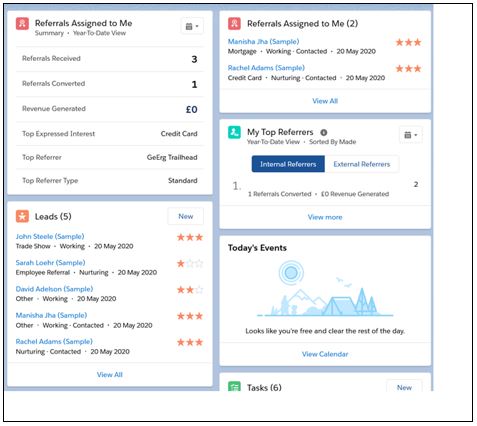
    The first additional functionality you’ll notice is these components on the Home page. These give you a little look into the main differences we’ll see between Financial Services Cloud and the Sales Cloud. Let’s have a look at some of the custom objects that Financial Services Cloud is built with out of the box:
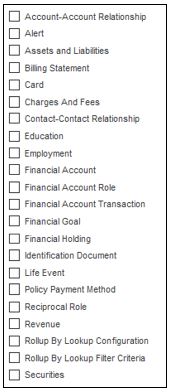
    Let’s start by looking at the Financial Account – you’ll see it halfway down this list. This is an account that you might manage as a financial institution – it might be a savings account, a current account, or perhaps something like a retirement fund. These Financial Accounts roll up to the “Primary Owner”. This is usually a Contact – and you’ll see that there’s a shiny new “Financials” tab on the Contact screen. It looks like this:
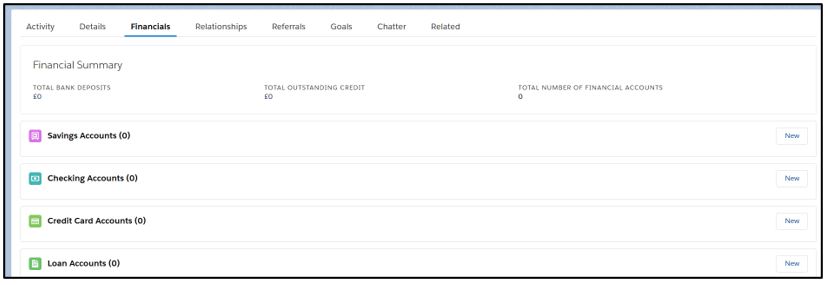
    You may have also noticed the “Financial Account Role” object listed above. This is to say when someone might own an account themselves, or perhaps they own it jointly – it might also mention someone who should have access to the account, such as a lawyer or a trust.

    dont miss out iconCheck out another amazing blog by Stimulus Consulting here: Top New Features in Salesforce Reporting

    The other objects are still important, of course, and here’s what they do:

    • Billing Statements contain any bills that have been sent to a customer
    • Cards are any credit cards or debit cards associated with a client
    • Charges and Fees are a record of any additional charges applied to an account, such as overdraft fees, transaction fees.
    • Assets and Liabilities represent any non-monetary assets that an account holder might own – such as real estate.
    • Revenues are the money generated from the customer’s accounts – such as interest, or stock values.
    • Securities are similar to assets but are objects like bonds or stocks that can be traded.
    • Holdings are investments that the account owner might have. These allow you to track changes to share prices to reflect the value of a customer’s portfolio.

    We hope you enjoyed this brief look into the differences between the Financial Services Cloud and Sales Cloud – we’ve really only dipped our toes into how these two platforms differ, so why not load up the trailhead and have a deeper look?

    Categories: Salesforce Cloud Platform
    Tagged: Assets and Liabilities, Billing Statements, Contact Screen, Custom Objects, Email Address, Financial Account, Financial Account Role, Financial Sector, financial services, Financial Services Cloud, Home Page, Org, Retail Banking, Sales App in Sales Cloud, Sales Cloud, Salesfolrce Trailhead, Salesforce, Salesforce Financial Services, Trailhead
    salesforce consultants
    Footer Forcetalks logo

    support@forcetalks.com

    • twitterx

    Quick Links

    Advertise with Us

    Salesforce® Articles

    Dreamforce 2023

    Top Salesforce® Bloggers 2023

    Top Salesforce Consultants

    Get Listed

    Company

    Contact Us

    About Us

    Privacy Policy

    Terms & Conditions

    InsightHub

    Salesforce Blogs

    Salesforce Videos

    Salesforce Groups

    Salesforce Jobs

    © 2026 - Forcetalks ● All Rights Reserved

    Salesforce® is a trademark of Salesforce® Inc. No claim is made to the exclusive right to use “Salesforce”. Any services offered within the Forcetalks website/app are not sponsored or endorsed by Salesforce®.

    Try AuditMyCRM - It is a Salesforce CRM Audit tool which comprehensively scans your Salesforce org and gives you the list of errors or warnings you need to take care of.
    We use cookies to enhance your browsing experience. Please see our privacy policy if you'd like more information on our use of cookies.