
-
What are Local and Global ids with respect to Salesforce Lightning Component?
What are Local and Global ids with respect to Salesforce Lightning Component?


Log In to reply.

Popular Salesforce Blogs

Salesforce Consulting Services: The Missing Piece in Puzzle for Users and Partners?
With the ever-increasing technology product portfolios and M&As of Salesforce, it can be challenging for most of the Salesforce partners to keep up with the…


Lightning Platform Mobile for Mobile App Development with Salesforce
Mobile has always had an effective and transformational impact on companies. But unfortunately, many companies face trouble delivering an intuitive user experience as a customer…


Triggers in Salesforce - All You Need to Know
Trigger A trigger is a piece of code that runs before and after a record in the force.com database is inserted, updated, or deleted. Triggers…

Popular Salesforce Videos

Salesforce Tutorial - Data Loader Installation On Windows - with Zulu Open JDK
Data Loader is utility to perform bulk database operation. Recently Salesforce has changed the way data loader need to be install. I explain end to…


Salesforce Career Personality Quiz
Which Salesforce career path is right for you? Take this 23 question quiz to learn which Salesforce career is the best match for your personality…

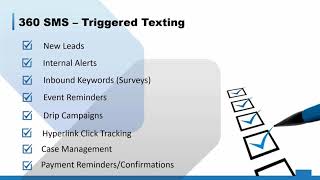
360 SMS App Demo
360 SMS App is considered to be the most reliable Salesforce SMS App. This App is listed on the AppExchange from the name "360 SMS…
