
-
How to enable schedule report options in Salesforce?
hi,
i was looking the trailhead https://trailhead.salesforce.com/modules/reports_dashboards/units/reports_dashboards_sharing_notifications .
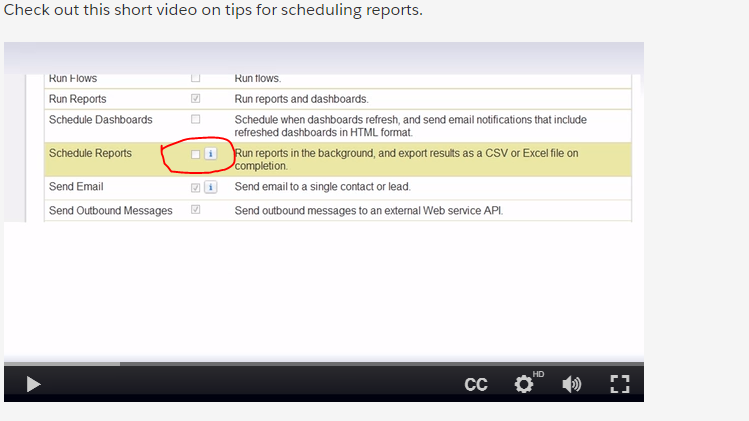
their is an option to select in the video on this page.

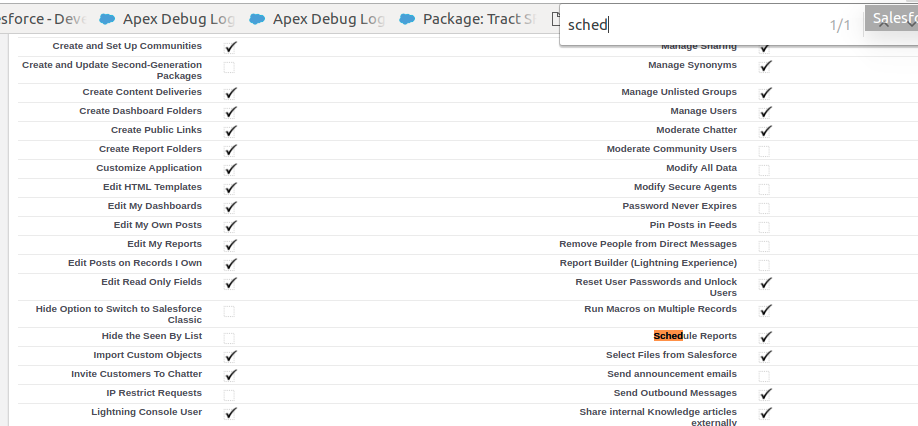
i am not getting this option to make active. can someone share the path to me.


Log In to reply.

Popular Salesforce Blogs

Top 6 Benefits of Salesforce QuickBooks Integration
QuickBooks is an essential accounting application that many businesses trust today. It allows accounting professionals to record transactions with ease and accuracy. Whether you're billing…


Marketing Cloud Connect: Syncing Data Back to Sales and Service Cloud
Marketing Cloud Connect excels at getting data into Marketing Cloud from Sales Cloud or Service Cloud but is limited in what it automatically syncs back to…


Dashboards in Salesforce - A Brief Guide
Dashboards in Salesforce are graphical representations of reports. Visualize data from reports as components. These components provide a summary of your organization's key analytics and…

Popular Salesforce Videos

Email to case in Salesforce | Learn Salesforce
In this video, Shrey explained complete Record Level Security in Salesforce which includes: 1. What is Email-to-case in Salesforce? 2. Where can Email-to-case be used?…


Basic Concepts of Salesforce | Salesforce Training Online
This video session on Salesforce online training covers the basic concepts of Salesforce and will give intense knowledge on Salesforce at a very high level.…

10 Example Future Method with Test Class | Asynchronous Apex | Salesforce Development Training Video
Salesforce uses a queue-based framework to handle asynchronous processes from such sources as future methods and batch Apex. This queue is used to balance request workload across…