
-
How to display Account Owner name in Visualforce Page?
How to display Account Owner name in Visualforce page?
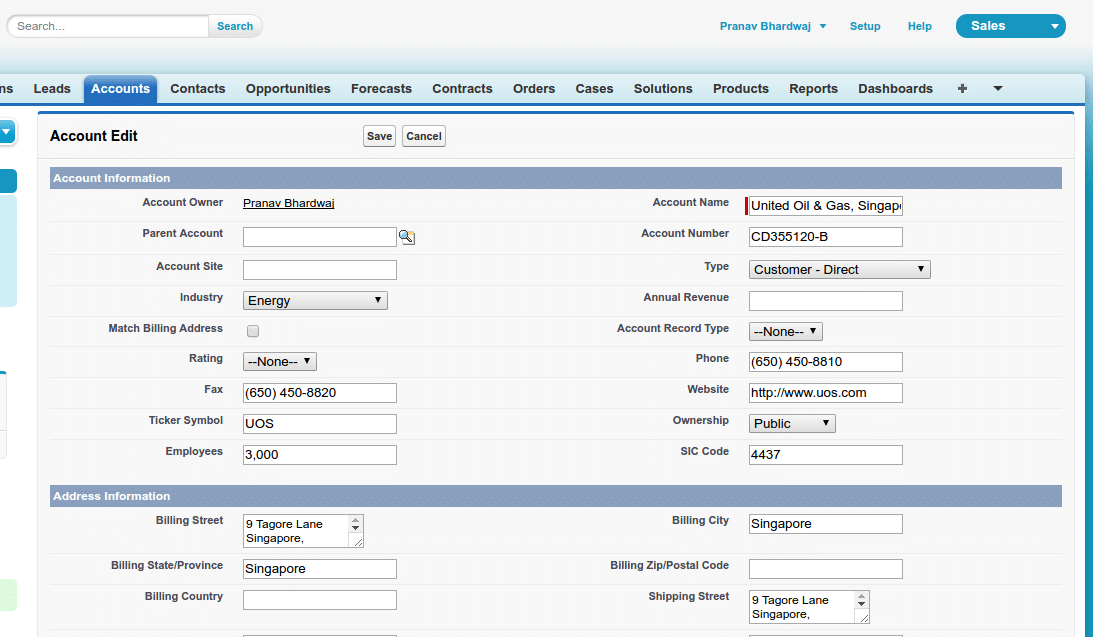
I wrote this code but only account owner label is shown not the name.
<apex:page Controller="AccountInsert" showHeader="true" sidebar="true">
<apex:form >
<apex:pageBlock title="Account Edit">
<apex:pageMessages /><apex:pageBlockButtons >
<apex:commandButton action="{!save}" value="Save"/>
<apex:commandButton action="{!cancel}" value="Cancel"/>
</apex:pageBlockButtons><apex:pageBlockSection columns="2" title="Account Information" collapsible="false">
<apex:outputfield value="{! Account.Ownerid}"/>
<apex:inputField value="{! Account.Name}"/>
<apex:inputField value="{! Account.ParentId}"/>
<apex:inputField value="{! Account.AccountNumber}"/>
<apex:inputField value="{! Account.Site}"/>
<apex:inputField value="{! Account.Type}"/>
<apex:inputField value="{! Account.Industry}"/>
<apex:inputField value="{! Account.AnnualRevenue}"/>
<apex:inputField value="{! Account.Match_Billing_Address__c}"/>
<apex:inputField value="{! Account.Rating}"/>
<apex:inputField value="{! Account.Phone}"/>
<apex:inputField value="{! Account.Fax}"/>
<apex:inputField value="{! Account.Website}"/>
<apex:inputField value="{! Account.TickerSymbol}"/>
<apex:inputField value="{! Account.Ownership}"/>
<apex:inputField value="{! Account.NumberOfEmployees}"/>
<apex:inputField value="{! Account.Sic}"/>
</apex:pageBlockSection><apex:pageBlockSection columns="2" title="Address Information" collapsible="false">
<apex:inputField value="{! Account.BillingStreet}"/>
<apex:inputField value="{! Account.BillingCity}"/>
<apex:inputField value="{! Account.BillingState}"/>
<apex:inputField value="{! Account.BillingPostalCode}"/>
<apex:inputField value="{! Account.BillingCountry}"/>
<apex:inputField value="{! Account.ShippingStreet}"/>
<apex:inputField value="{! Account.ShippingCity}"/>
<apex:inputField value="{! Account.ShippingState}"/>
<apex:inputField value="{! Account.ShippingPostalCode}"/>
<apex:inputField value="{! Account.ShippingCountry}"/>
</apex:pageBlockSection><apex:pageBlockSection columns="2" title="Additional Information">
<apex:inputField value="{! Account.CustomerPriority__c}"/>
<apex:inputField value="{! Account.SLA__c}"/>
<apex:inputField value="{! Account.SLAExpirationDate__c}"/>
<apex:inputField value="{! Account.SLASerialNumber__c}"/>
<apex:inputField value="{! Account.NumberofLocations__c}"/>
<apex:inputField value="{! Account.UpsellOpportunity__c}"/>
<apex:inputField value="{! Account.Active__c}"/>
</apex:pageBlockSection><apex:pageBlockSection columns="1" title="Description Information">
<apex:inputField value="{! Account.Description}"/>
</apex:pageBlockSection></apex:pageBlock>
</apex:form>
</apex:page>Image for reference :



Log In to reply.

Popular Salesforce Blogs

Salesforce for Energy and Utility Sector for Adapting to New Customer Expectations
Energy and utility companies are known to have contingency plans to remain stable in any uncertain situation. And that’s where digitization has helped such companies…


Best Practices in Testing | Salesforce Developer Guide
To be successful in the IT sector, you must be familiar with all of the finest testing procedures. It is critical to have testing best…


Learn How Salesforce CPQ Can Help Accelerate Sales
Growth often brings new challenges, and in sales, one of the biggest obstacles is manual quote configuration for each client. This time-consuming task can lead…
