Toggle Side Panel
Forcetalks
  • Home
  • Articles
    • All Articles
    • Blogs
    • Videos
    • Infographics
  • Consultants
    • Salesforce Product Expertise
      • Top Salesforce ConsultantsTop Salesforce Consultants
    • Salesforce Industry Expertise
    • Salesforce Experts by Location
  • Webinars
  • Contact Us
More options
    Sign in Sign up
    • Home
    • Articles
      • All Articles
      • Blogs
      • Videos
      • Infographics
    • Consultants
      • Salesforce Product Expertise
        • Top Salesforce ConsultantsTop Salesforce Consultants
      • Salesforce Industry Expertise
      • Salesforce Experts by Location
    • Webinars
    • Contact Us
    Close search

    Salesforce – Hubspot Integration #1: Setup Salesforce Integration with Hubspot

    parul-2
    Parul September 11, 2018

    Setup Salesforce Integration with Hubspot

    You might have came across various Salesforce integration with different third party tools to widen the business with more customers and closing the deal in no time. In this article, you will come to know about Salesforce integration with Hubspot. Once the Hubspot is integrated with Salesforce, sales and marketing will be on the same page and working together for your company goal.

    Well let’s see the step to integrate Salesforce with Hubspot:

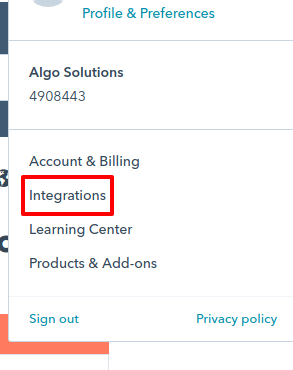
    Step 1.) In your Hubspot account, from the top right corner, click on your Account name and select ‘Integration’.
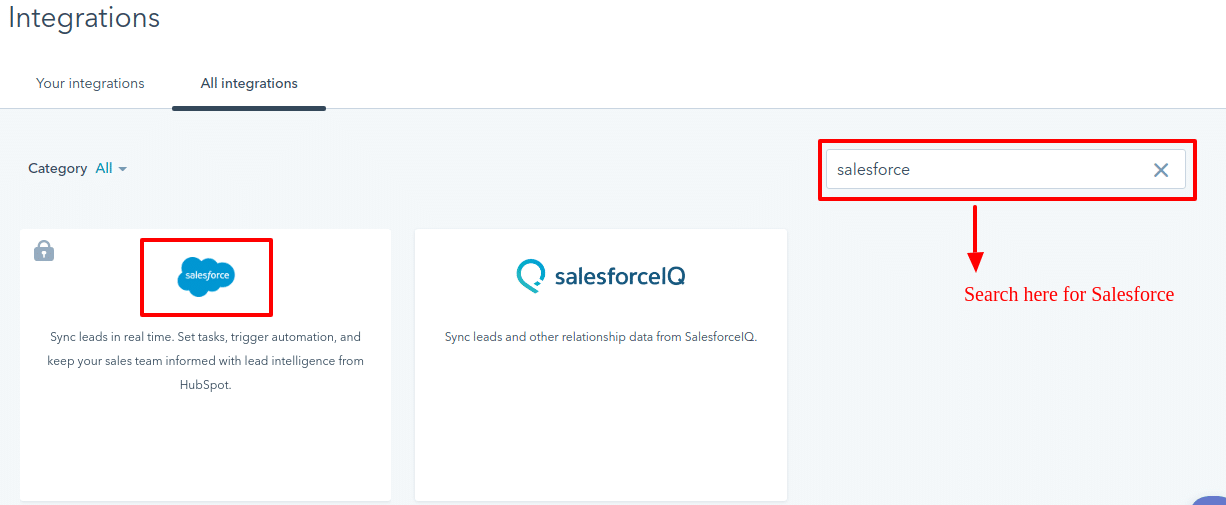
    Step 2.) Navigate to All Integration tab and search for Salesforce.
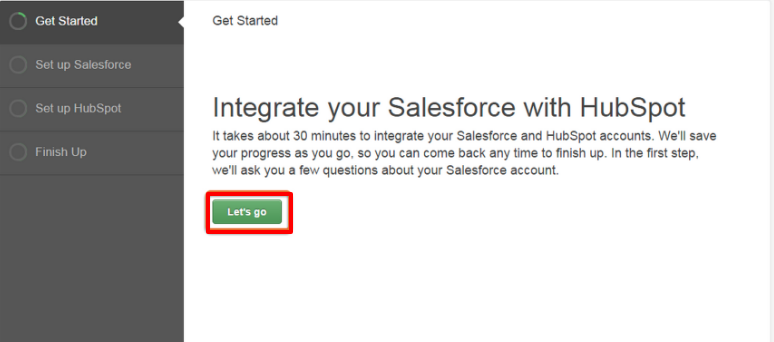
    Step 3.) From this page you will start configuration for integration. Click on Let’s go.
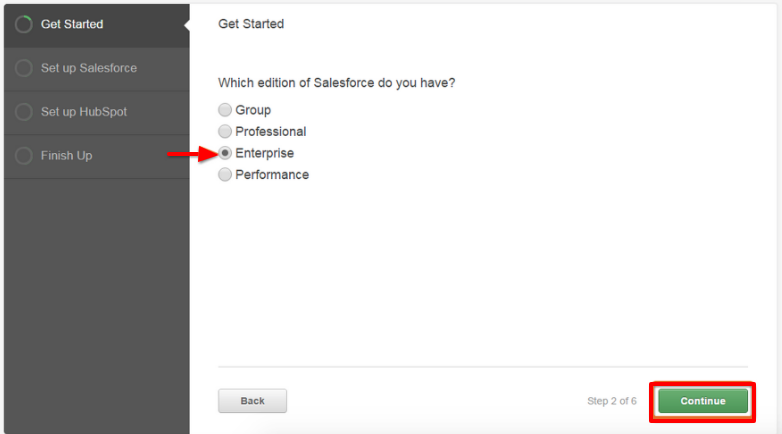
    Step 4.) Choose the edition of the salesforce you have and select continue.
    Step 5.) Choose the administrative privileges if you have and confirm if you are setting up the things for Sandbox environment or Production environment.

    Step 6.) After setting up, install the Hubspot package in your Salesforce account.
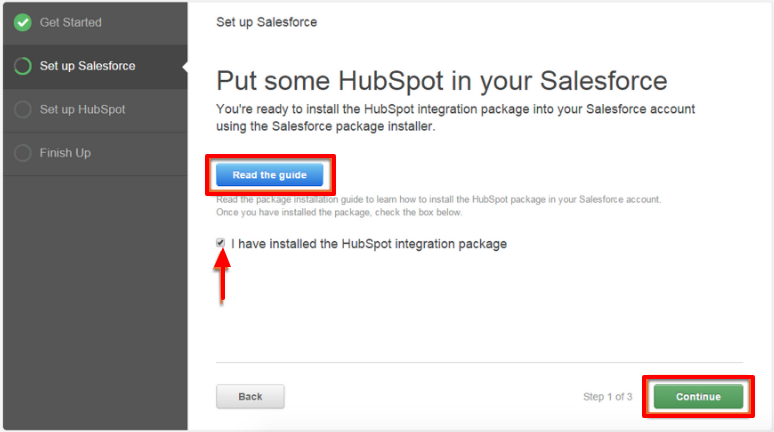
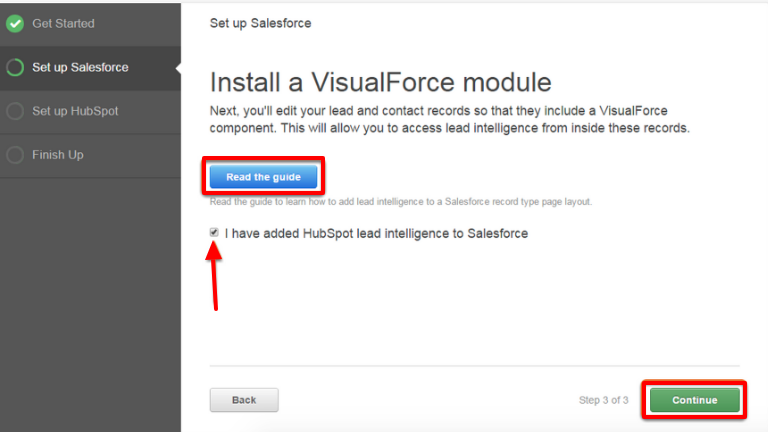
    Step 7.) When you click continue , you will be redirected to the install the VisualForce module.

    The visualforce module add a section on Contact or lead record and show the data from Hubspot as well.
    Step 8.) Now you have to give permission to your salesforce account to connect with Hubspot.

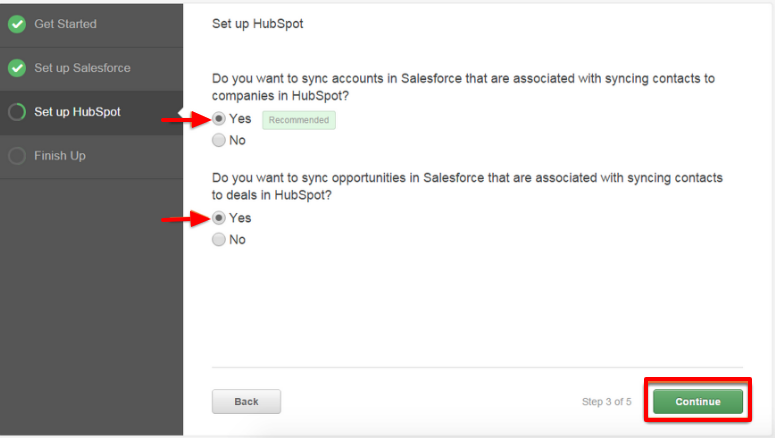
    Step 9.) Next, you need to confirm what the things you need to sync like Accounts, Contact and Opportunities.
    Step 10.) Once you are done with these steps, you would be redirected to the review the steps, in case you want to change some configuration at point of time.
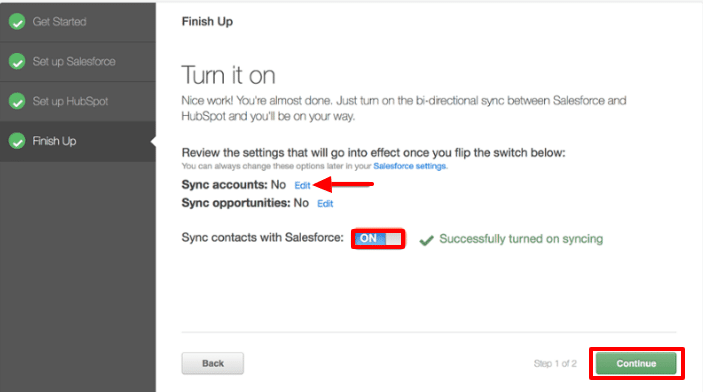
    After clicking Continue, you will get the confirmation box for integration status.

    Congratulation.!! You have now integrated the Salesforce with Hubspot successfully.

    If you have existing Salesforce records that you would like to sync to Hubspot right away click Import Now or View Setting to further customize the integration.
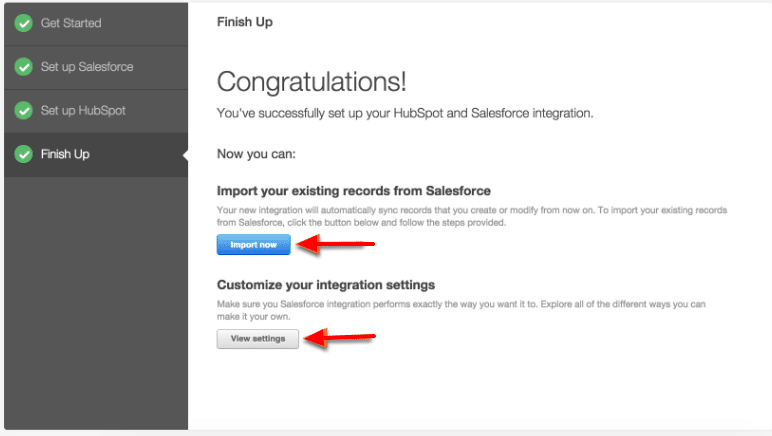
    IMPORTANT: If you don’t import your records, they won’t be visible in Hubspot unless and until you synchronize them.

    Hope this will help you.

    Thanks.

    Categories: Salesforce integration
    Tags: Authentication Configuration, Hubspot, Production Environment, Salesforce Account, Salesforce Contacts, Salesforce Customization, Salesforce Data Import, Salesforce Integration, Salesforce integration with Hubspot, Salesforce Leads, Salesforce Records, Salesforce Sandbox, Salesforce Steps, Sandbox Environment, Visualforce

    Get listed your company

    Have an innovative Salesforce solution that delivers faster, smarter results?
    Join the Marketplace

    [adinserter block=”16″]

    best salesforce consultants
    best salesforce consultants
    best salesforce consultants
    salesforce consultants

    [adinserter block=”10″]

    salesforce consultants

    [adinserter block=”10″]

    salesforce consultants

    [adinserter block=”10″]

    salesforce consultants

    [adinserter block=”10″]

    salesforce consultants
    salesforce consultants

    [adinserter block=”10″]

    salesforce consultants
    Footer Forcetalks logo

    support@forcetalks.com

    • twitterx

    Quick Links

    Advertise with Us

    Salesforce® Articles

    Dreamforce 2023

    Top Salesforce® Bloggers 2023

    Top Salesforce Consultants

    Get Listed

    Company

    Contact Us

    About Us

    Privacy Policy

    Terms & Conditions

    InsightHub

    Salesforce Blogs

    Salesforce Videos

    Salesforce Groups

    Salesforce Jobs

    Forcetalks

    © 2026 - Forcetalks ● All Rights Reserved

    Salesforce® is a trademark of Salesforce® Inc. No claim is made to the exclusive right to use “Salesforce”. Any services offered within the Forcetalks website/app are not sponsored or endorsed by Salesforce®.