

Create a Modal Popup in Salesforce

When we develop our requirements, sometimes we need to show a popup for some operations. To solve this problem we develop the things using Visualforce page and Apex controller. So let’s start with the procedures to show the popup on Visualforce pages.

Setup -> Visualforce Pages -> new
Put following code:
<apex:page controller="popupClass">
    <apex:form>
        <apex:commandButton value="Show" action="{!showPopup}" rerender="tstpopup"/>
        <apex:outputPanel id="tstpopup">
            <apex:outputPanel styleClass="popupBackground" layout="block" rendered="{!displayPopUp}"/>
            <apex:outputPanel styleClass="custPopup" layout="block" rendered="{!displayPopUp}">
                <apex:commandButton value="Hide Pop up" action="{!closePopup}" rerender="tstpopup"/>
            </apex:outputPanel>
        </apex:outputPanel>
    </apex:form>
    <style type="text/css">
        .custPopup{ background-color: white; border-width: 2px; border-style: solid; z-index: 9999; left: 50%; padding:11px; position: absolute; width: 600px; margin-left: -240px; top:100px; }
        .popupBackground{ background-color:black; opacity: 0.20; filter: alpha(opacity = 20); position: absolute; width: 100%; height: 100%; top: 0; left: 0; z-index: 9998; }
    </style>
</apex:page>
Following are steps to create apex class:
Setup -> Apex Classes -> new
Put following code :
public class popupClass {
    public boolean displayPopup {get;set;}
    public void closePopup()
    {
        displayPopup = false;
    }
    public void showPopup()
    {
        displayPopup = true;
    }
}
Following is the output of above-written code :
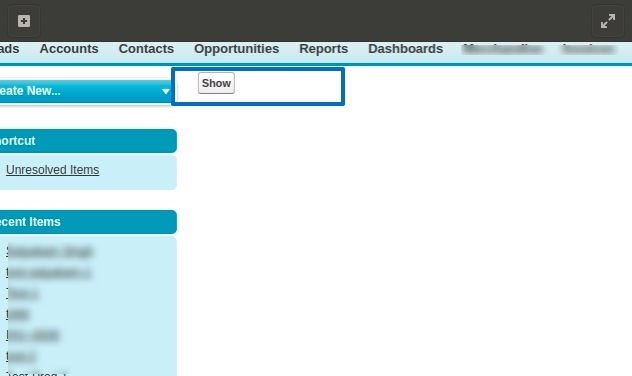
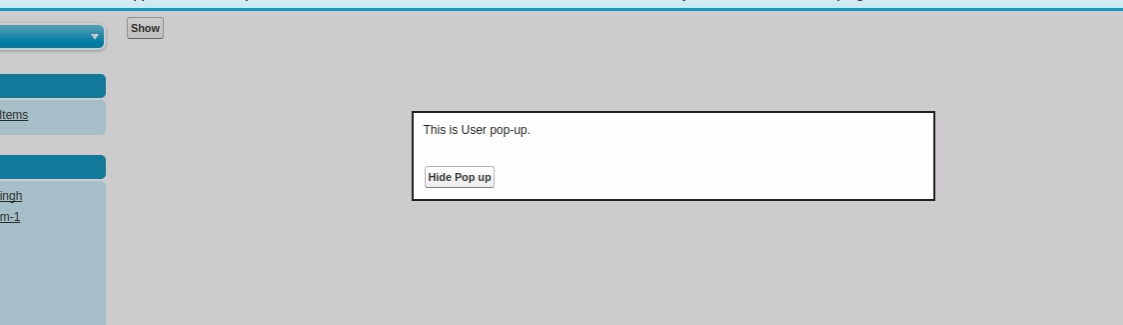
When you click on 'Show' button :
Thanks


