Toggle Side Panel

  • Blogs
  • Consultants
    • Salesforce Product Expertise
      • Top Salesforce ConsultantsTop Salesforce Consultants
      • Marketing Cloud ConsultantsMarketing Cloud Consultants
      • Service Cloud ConsultantsService Cloud Consultants
      • Experience Cloud ConsultantsExperience Cloud Consultants
      • Analytics Cloud ConsultantsAnalytics Cloud Consultants
    • Salesforce Industry Expertise
      • Non-Profit Cloud ConsultantsNon-Profit Cloud Consultants
      • Financial Service Cloud ConsultantsFinancial Service Cloud Consultants
      • Health Cloud ConsultantsHealth Cloud Consultants
      • Commerce Cloud ConsultantsCommerce Cloud Consultants
      • Manufacturing Cloud ConsultantsManufacturing Cloud Consultants
    • Salesforce Experts by Location
      • USATop Salesforce Consultants in USA
      • IndiaTop Salesforce Consultants in India
      • AustraliaTop Salesforce Consultants in Australia
      • United KingdomTop Salesforce Consultants in UK
      • CanadaTop Salesforce Consultants in Canada
  • Webinars
  • Contact Us
  • Discussions
More options
    Sign in Sign up
    • Blogs
    • Consultants
      • Salesforce Product Expertise
        • Top Salesforce ConsultantsTop Salesforce Consultants
        • Marketing Cloud ConsultantsMarketing Cloud Consultants
        • Service Cloud ConsultantsService Cloud Consultants
        • Experience Cloud ConsultantsExperience Cloud Consultants
        • Analytics Cloud ConsultantsAnalytics Cloud Consultants
      • Salesforce Industry Expertise
        • Non-Profit Cloud ConsultantsNon-Profit Cloud Consultants
        • Financial Service Cloud ConsultantsFinancial Service Cloud Consultants
        • Health Cloud ConsultantsHealth Cloud Consultants
        • Commerce Cloud ConsultantsCommerce Cloud Consultants
        • Manufacturing Cloud ConsultantsManufacturing Cloud Consultants
      • Salesforce Experts by Location
        • USATop Salesforce Consultants in USA
        • IndiaTop Salesforce Consultants in India
        • AustraliaTop Salesforce Consultants in Australia
        • United KingdomTop Salesforce Consultants in UK
        • CanadaTop Salesforce Consultants in Canada
    • Webinars
    • Contact Us
    • Discussions
    Close search

    Activity › Forums › Salesforce® Discussions › How can we get all Desk.com case in Salesforce?

    Tagged: Account, Chatter, Desk Dot Com, Related List

    • Salesforce® Discussions

      How can we get all Desk.com case in Salesforce?

      Posted by Himanshu on April 30, 2016 at 5:27 PM

      How can we get all Desk.com case in Salesforce?
      Manpreet replied 9 years, 5 months ago 2 Members · 1 Reply
      • Account
      • Chatter
      • Desk Dot Com
      • Related List
    • 1 Reply
    • Manpreet

      Member
      March 23, 2017 at 11:47 AM

      You've just setup your Desk to Salesforce integration and now would like to bring over all of your existing cases into the related list within Salesforce, you accomplish this task using two different kind of rules and a Custom Case Field.

      So let's get started with the Custom Case Field.

      1.) Go to the Admin Panel → Cases → Cases → Custom Fields
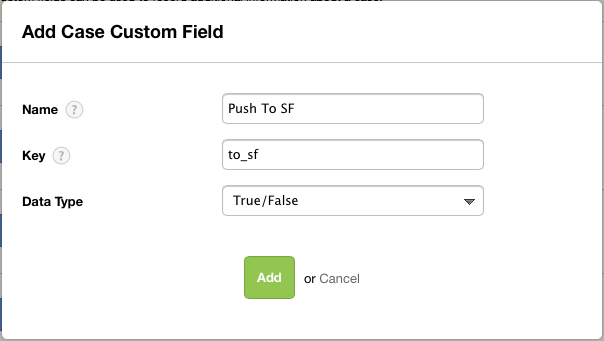
      2.) Click on the big green button at the top of the page to add a field:

      1

      3.)Let's name it Push To SF, and make it a checkbox:2

      Now if you are using the system default Case Theme then the field will show up automatically but if you are using a Custom Case Theme then you will need to add this field to your theme.

      Ok now that we have added the Custom Case Field we now need to create the Case Updated Rule

      We are actually going to edit the Default Salesforce Rule that is in the Case Updated "bucket".
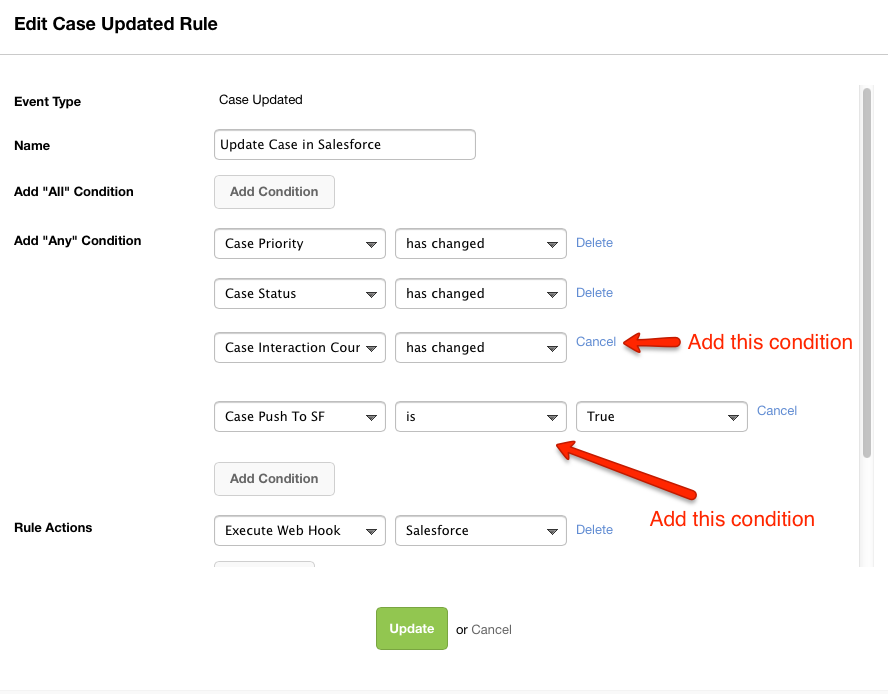
      1.) Go to the Admin Panel → Cases → Rules → Cases Updated
      2.) Find the "Update Case in Salesforce" Rule and click on the cog on the right hand side to edit the rule:

      3

      3.) We are going to add two new conditions to the rule:

      The first one is "Case Interaction Count" "has changed", this will indicate that something has happened to the case.

      Next "Case Push To SF" "is" "True", this condition will see that the checkbox has been checked.


      4

      Now click on "Update".

      Now for our Time Rule

      1.) Go to the Admin Panel → Cases → Rules → Time Rule
      2.) Click on "Add Rule" as you did before, we'll name this "Push to SF".
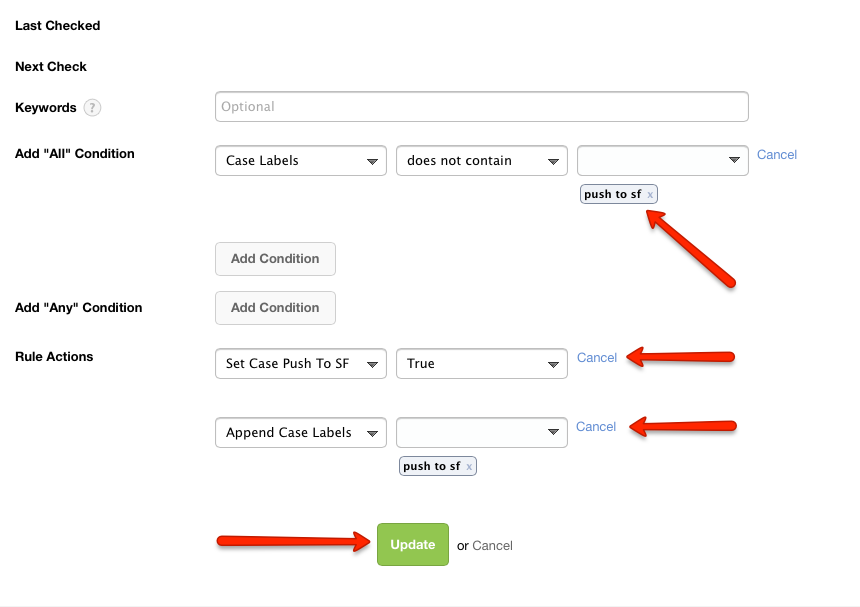
      3.) We are going to add a condition to the "All" conditions and then two "Rule Actions"

      So in the All conditions add a condition that is defined as:

      "Case Labels "does not contain" "push to sf"

      Now create two Rule Actions, the first rule action is to "Set Case Push To SF" "True", and then "Append Case Labels" "push to sf"

      Then click on "Update"

      5


      Once all of your existing cases are pushed over to SF you can turn off or delete the time rule and remove the values from the Case Updated rule.

      Once all references to the custom field are removed from the rules you can then delete the custom case field.

      Thanks.

    Log In to reply.

    • Public
    • All Members
    • My Connections
    • Only Me
    • Public
    • All Members
    • My Connections
    • Only Me
    • Public
    • All Members
    • My Connections
    • Only Me

    Popular Salesforce Blogs

    Smart Dynamic Forms for Salesforce

    Smart Dynamic Forms for Salesforce

    Blog in Salesforce integration

    Do it yourself - Dynamic forms, conditional logic and realtime field population for salesforce without writing a single line of code. When working with online…

    Salesforce Forms
    Ori Sep 19, 2017
    9,417  Views

    Takeaways from TrailheaDX'17

    Blog in Coding and Scripting

    "The Welkin Suite Team just recently got back from attending TrailheaDX'17 in San Francisco, this last weekend, and we really appreciated the opportunity to visit…

    Cloud Computing, Salesforce, Salesforce Community, Salesforce Developers, Salesforce Development
    The Welkin Suite Jul 7, 2017
    3,697  Views

    How to Boost Your Business with a Salesforce Partner Company?

    Blog in Salesforce Consultant

    Are you looking to take your business to the next level? If so, consider leveraging the power of Salesforce, one of the world's leading customer…

    Business Enhancement, Business Excellence, Business Goals, Business Growth, Business Objectives
    Infodriven Nov 22, 2023
    1,860  Views

    Popular Salesforce Videos

    Install Adobe Sign & Send Agreements For E-sign in Salesforce

    Install Adobe Sign & Send Agreements For E-sign in Salesforce

    Video in Others, Salesforce Training

    Learn the steps involved in installing Adobe Sign and sending agreements for e-sign in Salesforce. This tutorial will cover the following points - 1. Install…

    Salesforce Training, Salesforce Tutorial, AppExchange, Salesforce Video, Salesforce Learning
    Algoworks Feb 26, 2021
    2,295  Views
    Being a Sr. Salesforce Consultant | SFDC Consultant Podcast

    Being a Sr. Salesforce Consultant | SFDC Consultant Podcast

    Video in Salesforce Consultant

    What it is like being a Sr. Salesforce Developer at a consulting firm. What a day in Sr. Salesforce Consultant's life looks like. Struggles of…

    Salesforce Developer, Salesforce Consultant, Salesforce Consulting, SFDC, Salesforce Video
    Prafull Aug 4, 2020
    1,841  Views
    Manage Record Access and Visibility in Salesforce

    Manage Record Access and Visibility in Salesforce

    Video in Salesforce Training

    Watch this video to learn all about managing record access and visibility in Salesforce. Do let us know in the comment section if you have…

    Salesforce Training, Salesforce Tutorial, Salesforce Records, Salesforce Video, Salesforce Learning
    Pooja Nov 18, 2021
    2,120  Views
    Footer Forcetalks logo

    support@forcetalks.com

    • twitterx

    Quick Links

    Advertise with Us

    Salesforce® Articles

    Dreamforce 2023

    Top Salesforce® Bloggers 2023

    Top Salesforce Consultants

    Get Listed

    Company

    Contact Us

    About Us

    Privacy Policy

    Terms & Conditions

    InsightHub

    Salesforce Blogs

    Salesforce Videos

    Salesforce Groups

    Salesforce Jobs

    © 2026 - Forcetalks ● All Rights Reserved

    Salesforce® is a trademark of Salesforce® Inc. No claim is made to the exclusive right to use “Salesforce”. Any services offered within the Forcetalks website/app are not sponsored or endorsed by Salesforce®.

    We use cookies to enhance your browsing experience. Please see our privacy policy if you'd like more information on our use of cookies.