
-
How to implement Print detail and send email button in Salesforce?
On click of Print Detial button show selected contacts detail in pdf.
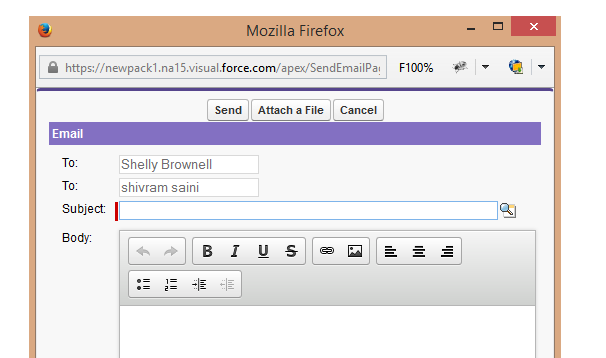
On click on send email button open a new window. It should look like this User-added image
Here is the code
public class SearchRecords {
public boolean display{get;set;}
public boolean disable{get;set;}
public String AccId{get;set;}
public string getstring{get;set;}
public List<Account> accountlist {get;set;}
public list<Contact> conList{get;set;}
private integer totalRecs = 0;
private integer OffsetSize = 0;
private integer LimitSize=6;
public String selectConId{get;set;}
public contact con{get;set;}
public List<String> conidlist{get;set;}
public void searchRecords(){
conidlist = new List<String>();
display=false;
accountlist= new list<Account>();
if(getstring!=null){
accountlist= Database.query('select id,AccountNumber,name,Phone from Account where name like \'%'+getstring+'%\'');
}
}
public List<WrapperClass> listWrapper {get;set;}
public void newClick(){
disable=false;
LimitSize=6;
OffsetSize=0;
showContact();
}public void selectCont(){
if(selectConId!=null && selectConId!=''){
conidlist.add(selectConId);
}
}
public void showContact(){display=true;
listWrapper = new List<WrapperClass>();
system.debug('====>'+LimitSize);
system.debug('====>'+OffsetSize);
List<Contact> conlist =[SELECT id,Title,Fax,Birthdate,Name,Account.Name,Phone,Email FROM Contact WHERE AccountId=:AccId LIMIT :LimitSize OFFSET :OffsetSize];
if(conlist!=NULL){
totalRecs = conlist.size();
for(contact con:conlist)
{
listWrapper.add(new WrapperClass(con));
}
}
}
public pageReference SendEmail(){
return null;
}
public pageReference PrintDetail(){
if(conidlist.size()>0){
String conIdsStr='';
for(String conId : conidlist){
conIdsStr+=conId+'@@';
}
PageReference acctPage = new pageReference('Apex/printContactDetail');
return acctPage;
}else
return null;}
public void FirstPage(){
OffsetSize = 0;
showContact();
}
public void previous(){
OffsetSize = OffsetSize - LimitSize;
showContact();
}
public void next(){
OffsetSize = OffsetSize + LimitSize;
System.debug('>>>>>OffsetSize '+OffsetSize);
showContact();
}
public void LastPage(){
disable=true;
OffsetSize = totalrecs - math.mod(totalRecs,LimitSize);
showContact();}
public boolean getprev(){
if(OffsetSize == 0)
return true;
else
return false;}
public boolean getnxt(){
if((OffsetSize + LimitSize) > totalRecs)
return true;
else
return false;
}
public class WrapperClass {
public boolean fgjj;
public Boolean checked {get;set;}
public contact con {get;set;}
public WrapperClass(contact con) {
this.con=con;
checked=false;
}
}
}<apex:page controller="SearchRecords" showHeader="true" >
<apex:form id="frm">
<!----<apex:actionFunction name="showcon" action="{!showContact}" reRender="frm" /> --->
<apex:pageblock >
<apex:pageBlockSection title="Search Account Records" columns="1">
Enter Name<apex:inputText value="{!getstring}" id="theTextInput"/>
<apex:commandButton action="{!searchRecords}" value="Search" id="theSearch" reRender="frm"/>
</apex:pageBlockSection>
<apex:actionFunction action="{!selectCont}" name="selectCont" reRender="conSection" >
<apex:param assignTo="{!selectConId}" name="" value=""/>
</apex:actionFunction>
<apex:pageBlockSection title="Account Detail" id="pb">
<apex:pageBlocktable value="{!accountlist}" var="acc">
<apex:column >
<input type="radio" name="group1" reRender="{!display}" />
<apex:actionSupport event="onclick" action="{!newClick}" reRender="conSection" >
<apex:param assignTo="{!AccId}" name="accname" value="{!acc.id}"/>
</apex:actionSupport>
</apex:column>
<apex:column value="{!acc.Name}"/>
<apex:column value="{!acc.Phone}" />
</apex:pageBlocktable>
</apex:pageBlockSection><apex:outputPanel id="conSection">
<apex:pageBlockSection title="Related Contact" id="conpgblk" rendered="{!display}" >
<apex:outputPanel rendered="{!listWrapper.size != 0}">
<div align="center" draggable="false" >
<apex:commandButton value="Send Email" action="{!SendEmail}" />
<apex:commandButton value="Print Detail" action="{!PrintDetail}" />
</div>
<apex:pageBlockTable value="{!listWrapper}" id="pbt1" var="wrap">
<apex:column headerValue="Select">
<apex:inputCheckbox value="{!wrap.checked}" onclick="selectCont()" id="inputBox"/>
</apex:column>
<apex:column value="{!wrap.con.Name}"/>
<apex:column value="{!wrap.con.Phone}"/>
<apex:column value="{!wrap.con.Email}"/>
<apex:column value="{!wrap.con.Account.Name}"/>
<apex:column value="{!wrap.con.AccountId}"/>
<apex:column value="{!wrap.con.Id}"/>
</apex:pageBlockTable>
<apex:commandButton value="First Page" rerender="conpgblk" action="{!FirstPage}" disabled="{!prev}"/>
<apex:commandButton value="Previous" rerender="conpgblk" action="{!previous}" disabled="{!prev}"/>
<apex:commandButton value="Next" rerender="conpgblk" action="{!next}" disabled=""/>
<apex:commandButton value="Last Page" rerender="conpgblk" action="{!LastPage}" disabled="{!disable}"/>
</apex:outputPanel>
<apex:outputPanel rendered="{!listWrapper.size == 0}">
<b> NO RELATED CONTACTS FOR THIS ACCOUNT.</b>
</apex:outputPanel>
</apex:pageBlockSection>
</apex:outputPanel>
</apex:pageblock>
</apex:form>
</apex:page>

Log In to reply.

Popular Salesforce Blogs

Salesforce Hacks for a Successful Admin/Developer
1.) Salesforce Merge more than 3 Accounts at Once. With the Merge Accounts page provided by official SFDC selection screen, a user can only Merge at most of…


Salesforce Email and Events Integration Options
In the ever-evolving digital business landscape, a robust CRM platform like Salesforce becomes even more powerful when it can seamlessly integrate with your organization's email…


How to Set Up Web-to-Lead in Salesforce | The Complete Guide
What is Salesforce Web to Lead Salesforce web to lead is a tool for capturing and saving leads from your website. Salesforce has this capability…

Popular Salesforce Videos

Salesforce Winter '21 Highlights
Even in these unprecedented times when the world is struggling with a major pandemic that has brought everything to a standstill, Salesforce has strived hard…


Salesforce Tutorial For Beginners | Introduction To Salesforce | Salesforce Training
This video on Salesforce training will help you understand the easy and best tool for CRM and Branding. You will learn how to customize the…

Salesforce Lightning Development Tutorial - Hello World!
Salesforce Lightning Custom Component Development Tutorial for Beginners - Let us implement our first custom lightning component - Hello World! Video Resource: Lightning Evangelist
