
-
List Button does not work properly in Salesforce Lightning Experience
I have created a custom list button on a custom object and I set the behavior of the list button to "Display in existing window without sidebar or header".
This List button works fine in Salesforce classic, but when I switch to Salesforce lightning experience it stops workings.
When I click on the list button in Salesforce lightning it doesn't open in the existing window. It opens in a new tab.
Any help would be really appreciated.


Log In to reply.

Popular Salesforce Blogs

Partnership of The Year – Salesforce Team Up With Apple!
Salesforce and Apple are two popular tech giants who have simplified technology and contributed big time to the tech world. Salesforce is known as the…


Power of Search in Salesforce
Power of Search Salesforce Search: We use the built-in search function of the Salesforce platform to search for any record or file. It gives us…


FlexDeploy Loves Salesforce: DevOps for Salesforce
FlexDeploy is an enterprise DevOps platform with fully integrated support for Salesforce apps, metadata customizations, integrations and more. This is the first article in a blog…

Popular Salesforce Videos

4 Tips on How to Build Product Messaging & Positioning That Stands Out | Salesforce on Salesforce
Messaging and positioning work together and should be the North Star for any product launch. If done well, it will set you apart from the…


Google Lead Form Extension To Salesforce | Salesforce Tutorial
Google Lead Form extension to Salesforce. This tutorial will cover the following points - 1. Introduction Learn how to integrate leads from Google lead form…
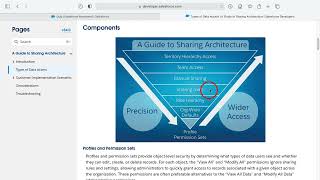
Salesforce Guide to Sharing Architecture
The Salesforce sharing model is an essential element in your organization's ability to provide secure application data access. Therefore, it's crucial to architect your sharing…
