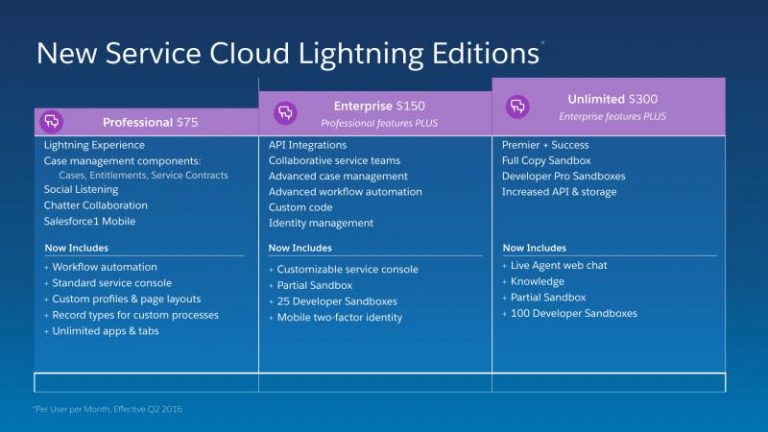
They are:-
Group.
Professional.
Enterprise.
Unlimited.
A Salesforce edition is the “type” (for want of a better work) of your Salesforce instance. The edition determines:
What functionality is available – e.g. contact manager edition doesn’t have opportunities
The limits – of which there are many – the maximum number of custom objects, the maximum number of tabs, the maximum number of custom fields.
Limits are a based on a combination of edition and user license. Data storage, for example, is 20Mb per licensed user on Enterprise Edition, but 120Mb per licensed user on Unlimited Edition.
With regard to different licenses per edition, yes there would be a different cost, but it would still be based on the edition. Thus you couldn’t mix Enterprise and Unlimited licenses in Unlimited Edition. Every user must have a license appropriate for the edition, and these get more expensive as the capability of the edition increases.
If you are considering multiple editions of Salesforce in a single organisation, you can create a salesforce app and deploy it to each edition. If you need the same data across all editions you’d need to look at Salesforce 2 Salesforce to replicate the data, which brings a few challenges of its own. For multi-edition you’d need to consider:
Reporting – there won’t be a single view of all the data available
Collaboration – as chatter is tied to a single edition, only users in that edition will be able to collaborate unless you set up multiple logins per user
Governance – if there is any common functionality you will have to replicate that across all editions
License costs – any users that need access to more than one edition will need a license for each
Multi-edition does have some advantages though:
Security and visibility – if you have complex requirements in this area it can be difficult to model and maintain in a single edition
Capacity and performance – the edition limits are multiplied by the number of editions, so you can have more custom applications, objects, tabs etc. Plus your data will be split across multiple editions which will scale better for large data volumes
Innovation – if you have complex customisations across a number of business units it can be difficult to make changes in a rapid fashion due to the need to test for all scenarios
The way I normally approach this is to start with a single edition and whenever a new business area comes on board, evaluate whether its better for them to share the existing edition or use one of their own.
Thanks