
-
How to implement Print detail and send email button in Salesforce?
On click of Print Detial button show selected contacts detail in pdf.
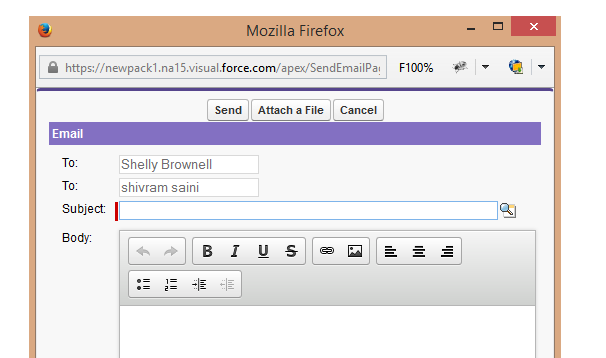
On click on send email button open a new window. It should look like this User-added image
Here is the code
public class SearchRecords {
public boolean display{get;set;}
public boolean disable{get;set;}
public String AccId{get;set;}
public string getstring{get;set;}
public List<Account> accountlist {get;set;}
public list<Contact> conList{get;set;}
private integer totalRecs = 0;
private integer OffsetSize = 0;
private integer LimitSize=6;
public String selectConId{get;set;}
public contact con{get;set;}
public List<String> conidlist{get;set;}
public void searchRecords(){
conidlist = new List<String>();
display=false;
accountlist= new list<Account>();
if(getstring!=null){
accountlist= Database.query('select id,AccountNumber,name,Phone from Account where name like \'%'+getstring+'%\'');
}
}
public List<WrapperClass> listWrapper {get;set;}
public void newClick(){
disable=false;
LimitSize=6;
OffsetSize=0;
showContact();
}public void selectCont(){
if(selectConId!=null && selectConId!=''){
conidlist.add(selectConId);
}
}
public void showContact(){display=true;
listWrapper = new List<WrapperClass>();
system.debug('====>'+LimitSize);
system.debug('====>'+OffsetSize);
List<Contact> conlist =[SELECT id,Title,Fax,Birthdate,Name,Account.Name,Phone,Email FROM Contact WHERE AccountId=:AccId LIMIT :LimitSize OFFSET :OffsetSize];
if(conlist!=NULL){
totalRecs = conlist.size();
for(contact con:conlist)
{
listWrapper.add(new WrapperClass(con));
}
}
}
public pageReference SendEmail(){
return null;
}
public pageReference PrintDetail(){
if(conidlist.size()>0){
String conIdsStr='';
for(String conId : conidlist){
conIdsStr+=conId+'@@';
}
PageReference acctPage = new pageReference('Apex/printContactDetail');
return acctPage;
}else
return null;}
public void FirstPage(){
OffsetSize = 0;
showContact();
}
public void previous(){
OffsetSize = OffsetSize - LimitSize;
showContact();
}
public void next(){
OffsetSize = OffsetSize + LimitSize;
System.debug('>>>>>OffsetSize '+OffsetSize);
showContact();
}
public void LastPage(){
disable=true;
OffsetSize = totalrecs - math.mod(totalRecs,LimitSize);
showContact();}
public boolean getprev(){
if(OffsetSize == 0)
return true;
else
return false;}
public boolean getnxt(){
if((OffsetSize + LimitSize) > totalRecs)
return true;
else
return false;
}
public class WrapperClass {
public boolean fgjj;
public Boolean checked {get;set;}
public contact con {get;set;}
public WrapperClass(contact con) {
this.con=con;
checked=false;
}
}
}<apex:page controller="SearchRecords" showHeader="true" >
<apex:form id="frm">
<!----<apex:actionFunction name="showcon" action="{!showContact}" reRender="frm" /> --->
<apex:pageblock >
<apex:pageBlockSection title="Search Account Records" columns="1">
Enter Name<apex:inputText value="{!getstring}" id="theTextInput"/>
<apex:commandButton action="{!searchRecords}" value="Search" id="theSearch" reRender="frm"/>
</apex:pageBlockSection>
<apex:actionFunction action="{!selectCont}" name="selectCont" reRender="conSection" >
<apex:param assignTo="{!selectConId}" name="" value=""/>
</apex:actionFunction>
<apex:pageBlockSection title="Account Detail" id="pb">
<apex:pageBlocktable value="{!accountlist}" var="acc">
<apex:column >
<input type="radio" name="group1" reRender="{!display}" />
<apex:actionSupport event="onclick" action="{!newClick}" reRender="conSection" >
<apex:param assignTo="{!AccId}" name="accname" value="{!acc.id}"/>
</apex:actionSupport>
</apex:column>
<apex:column value="{!acc.Name}"/>
<apex:column value="{!acc.Phone}" />
</apex:pageBlocktable>
</apex:pageBlockSection><apex:outputPanel id="conSection">
<apex:pageBlockSection title="Related Contact" id="conpgblk" rendered="{!display}" >
<apex:outputPanel rendered="{!listWrapper.size != 0}">
<div align="center" draggable="false" >
<apex:commandButton value="Send Email" action="{!SendEmail}" />
<apex:commandButton value="Print Detail" action="{!PrintDetail}" />
</div>
<apex:pageBlockTable value="{!listWrapper}" id="pbt1" var="wrap">
<apex:column headerValue="Select">
<apex:inputCheckbox value="{!wrap.checked}" onclick="selectCont()" id="inputBox"/>
</apex:column>
<apex:column value="{!wrap.con.Name}"/>
<apex:column value="{!wrap.con.Phone}"/>
<apex:column value="{!wrap.con.Email}"/>
<apex:column value="{!wrap.con.Account.Name}"/>
<apex:column value="{!wrap.con.AccountId}"/>
<apex:column value="{!wrap.con.Id}"/>
</apex:pageBlockTable>
<apex:commandButton value="First Page" rerender="conpgblk" action="{!FirstPage}" disabled="{!prev}"/>
<apex:commandButton value="Previous" rerender="conpgblk" action="{!previous}" disabled="{!prev}"/>
<apex:commandButton value="Next" rerender="conpgblk" action="{!next}" disabled=""/>
<apex:commandButton value="Last Page" rerender="conpgblk" action="{!LastPage}" disabled="{!disable}"/>
</apex:outputPanel>
<apex:outputPanel rendered="{!listWrapper.size == 0}">
<b> NO RELATED CONTACTS FOR THIS ACCOUNT.</b>
</apex:outputPanel>
</apex:pageBlockSection>
</apex:outputPanel>
</apex:pageblock>
</apex:form>
</apex:page>

Log In to reply.

Popular Salesforce Blogs

Data Quality Analysis Dashboard App in Salesforce
As you all know about the importance of Data Integration in Salesforce, we should understand that before Data integration, Data Quality analysis and management are…


Top Salesforce Spring '23 Sales Cloud Features
As you might have already read, we went through the top 10 Salesforce Spring '23 release features in our previous blog. Now, it is time…


Salesforce Financial Service Cloud for Insurance Brokerages to Programmed Process
Salesforce Financial Service Cloud for Insurance Brokerages to Streamline Processes Salesforce has launched the Financial Service Cloud (FSC) for insurance brokerages, an AI-powered solution aimed…

Popular Salesforce Videos

Salesforce Admin training : How to create a custom app in Salesforce?
In this tutorial, you will learn to create a custom app in Salesforce and go through a quick overview of Profiles. Profiles control the visibility of your…


How to Become Salesforce Developer in 2022 | Salesforce Career Path
Anyone can become a Salesforce developer. It takes to learn Salesforce-specific developer skill sets and does not account for time spent in formal education or…


Nonprofit Summit 2022 - Go Further with Salesforce Reports and Dashboards Hands-on Training
Salesforce reports and dashboards are the analytical sides of CRM. They are used to convert business requirements into Visual representations like Graphs, Pie Charts, Tables,…