Toggle Side Panel

  • Home
  • Articles
    • All Articles
    • Blogs
    • Videos
    • Infographics
  • Consultants
    • Salesforce Product Expertise
      • Top Salesforce ConsultantsTop Salesforce Consultants
      • Marketing Cloud ConsultantsMarketing Cloud Consultants
      • Service Cloud ConsultantsService Cloud Consultants
      • Experience Cloud ConsultantsExperience Cloud Consultants
      • Analytics Cloud ConsultantsAnalytics Cloud Consultants
    • Salesforce Industry Expertise
      • Non-Profit Cloud ConsultantsNon-Profit Cloud Consultants
      • Financial Service Cloud ConsultantsFinancial Service Cloud Consultants
      • Health Cloud ConsultantsHealth Cloud Consultants
      • Commerce Cloud ConsultantsCommerce Cloud Consultants
      • Manufacturing Cloud ConsultantsManufacturing Cloud Consultants
    • Salesforce Experts by Location
      • USATop Salesforce Consultants in USA
      • IndiaTop Salesforce Consultants in India
      • AustraliaTop Salesforce Consultants in Australia
      • United KingdomTop Salesforce Consultants in UK
      • CanadaTop Salesforce Consultants in Canada
  • Webinars
  • Contact Us
  • Discussions
More options
    Sign in Sign up
    • Home
    • Articles
      • All Articles
      • Blogs
      • Videos
      • Infographics
    • Consultants
      • Salesforce Product Expertise
        • Top Salesforce ConsultantsTop Salesforce Consultants
        • Marketing Cloud ConsultantsMarketing Cloud Consultants
        • Service Cloud ConsultantsService Cloud Consultants
        • Experience Cloud ConsultantsExperience Cloud Consultants
        • Analytics Cloud ConsultantsAnalytics Cloud Consultants
      • Salesforce Industry Expertise
        • Non-Profit Cloud ConsultantsNon-Profit Cloud Consultants
        • Financial Service Cloud ConsultantsFinancial Service Cloud Consultants
        • Health Cloud ConsultantsHealth Cloud Consultants
        • Commerce Cloud ConsultantsCommerce Cloud Consultants
        • Manufacturing Cloud ConsultantsManufacturing Cloud Consultants
      • Salesforce Experts by Location
        • USATop Salesforce Consultants in USA
        • IndiaTop Salesforce Consultants in India
        • AustraliaTop Salesforce Consultants in Australia
        • United KingdomTop Salesforce Consultants in UK
        • CanadaTop Salesforce Consultants in Canada
    • Webinars
    • Contact Us
    • Discussions
    Close search
    Grant Account Login Access in Salesforce

    Grant Account Login Access in Salesforce

    Ratnakar Mar 19, 2018
    12,953  Views

    Grant Account login access in Salesforce is a standard inbuilt salesforce feature. It might possible that sometimes you have queries or issues with salesforce itself or the applications you have installed in your Salesforce Org. In order to assist with the issue, you can grant account login access to the salesforce.com support or other Provider support whose applications you have installed in your org for a definite time.

    This is the way to support can login into your org, using your login and can fix the issues you are facing.

    To Grant Account login access in Salesforce you can follow these simple steps :

    Step-1

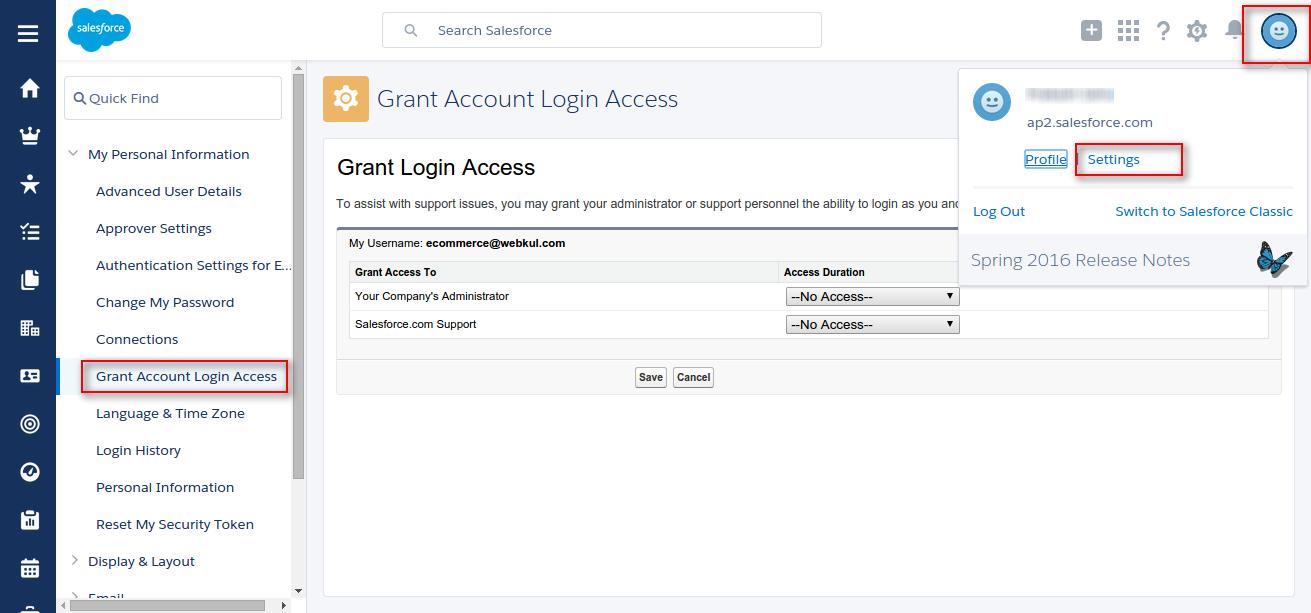
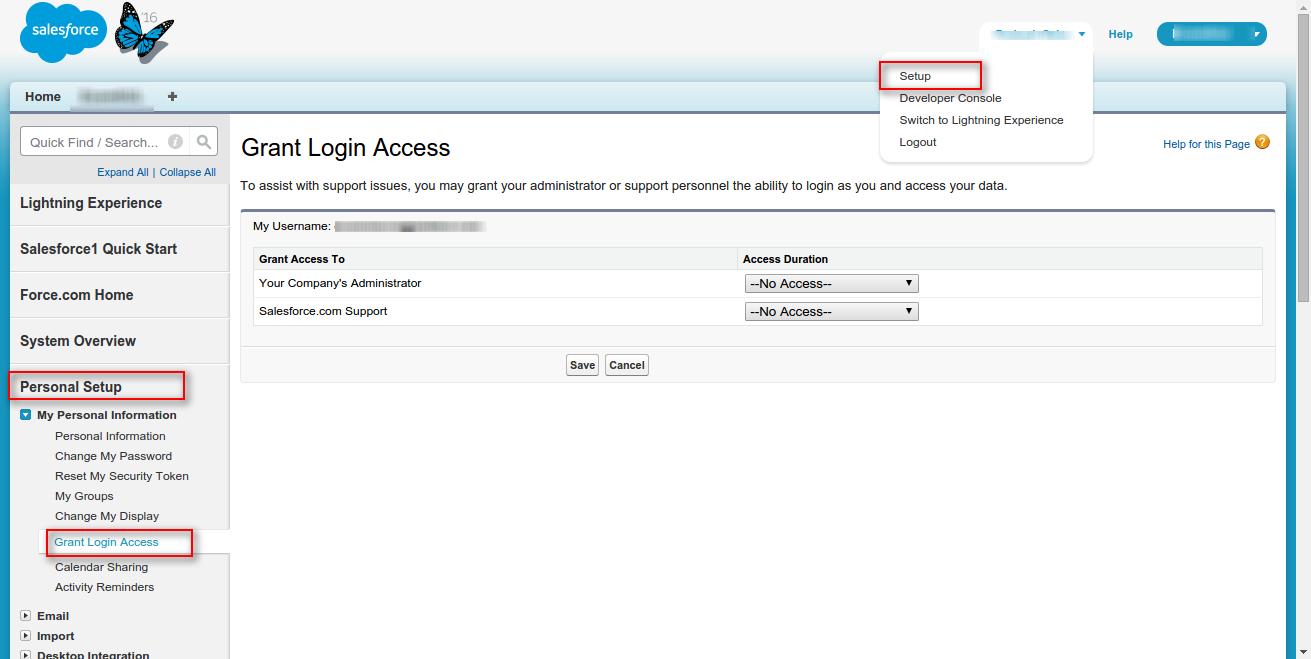
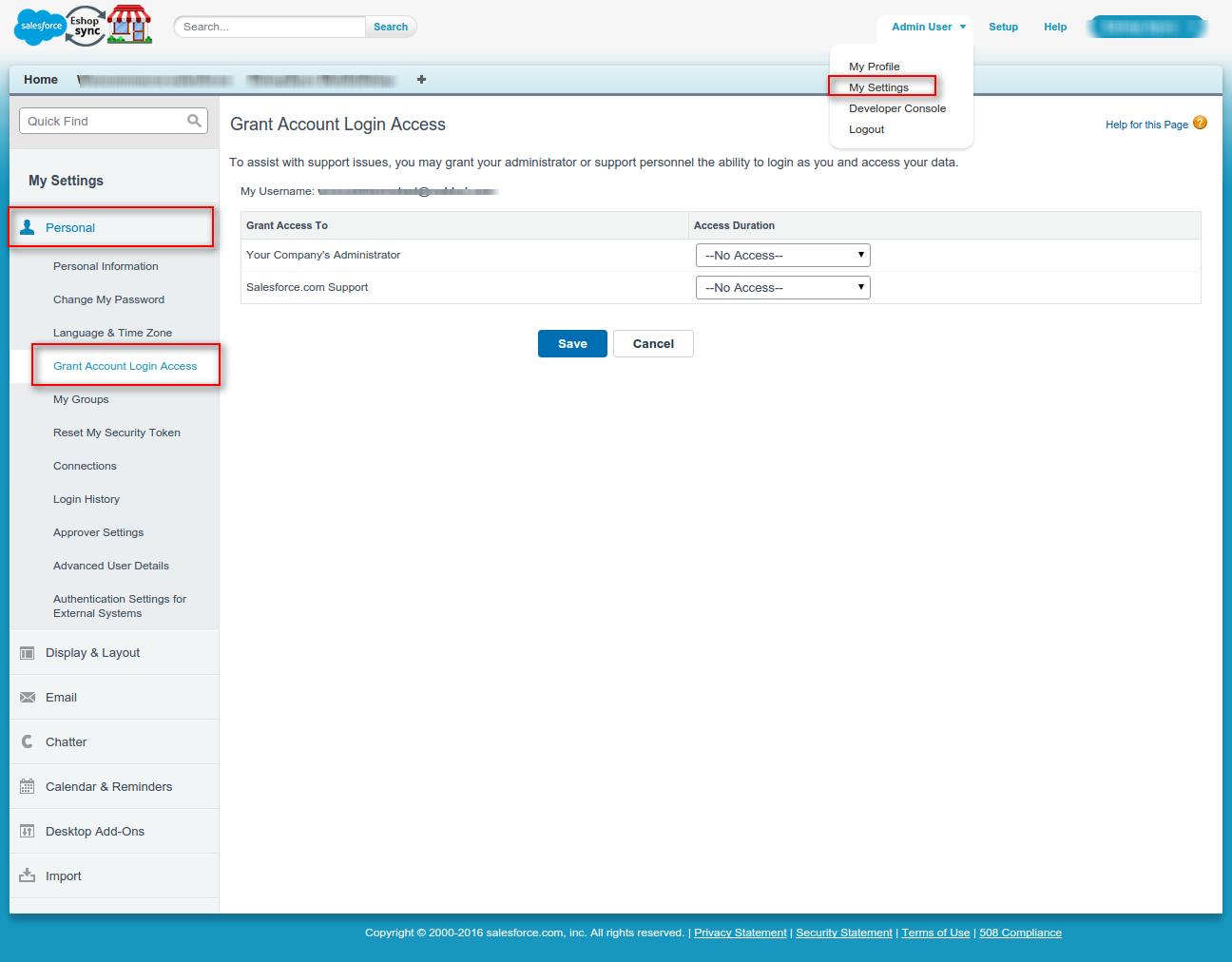
    Go to-> Grant Account login access option in your personal setup.Find ‘Personal Setup’, at one of these places-

    • In Lighting Experience, go to Settings->My personal Information->Grant Account login access.
      Lightning-Experience-Salesforce-2
    • In the older salesforce classic setup go to Setup-> Personal Information-> Grant Account login access

      Grant-Login-Access-Salesforce-Developer-Edition
    • In the newer salesforce classic setup go to My Settings > Personal > Grant Account login access.
      Grant-Account-Login-Access-Salesforce-Developer-Edition

    Step-2

    Select the Access duration i.e how long support can have access to your account and save.

    After saving, the Support will able to login to your account.
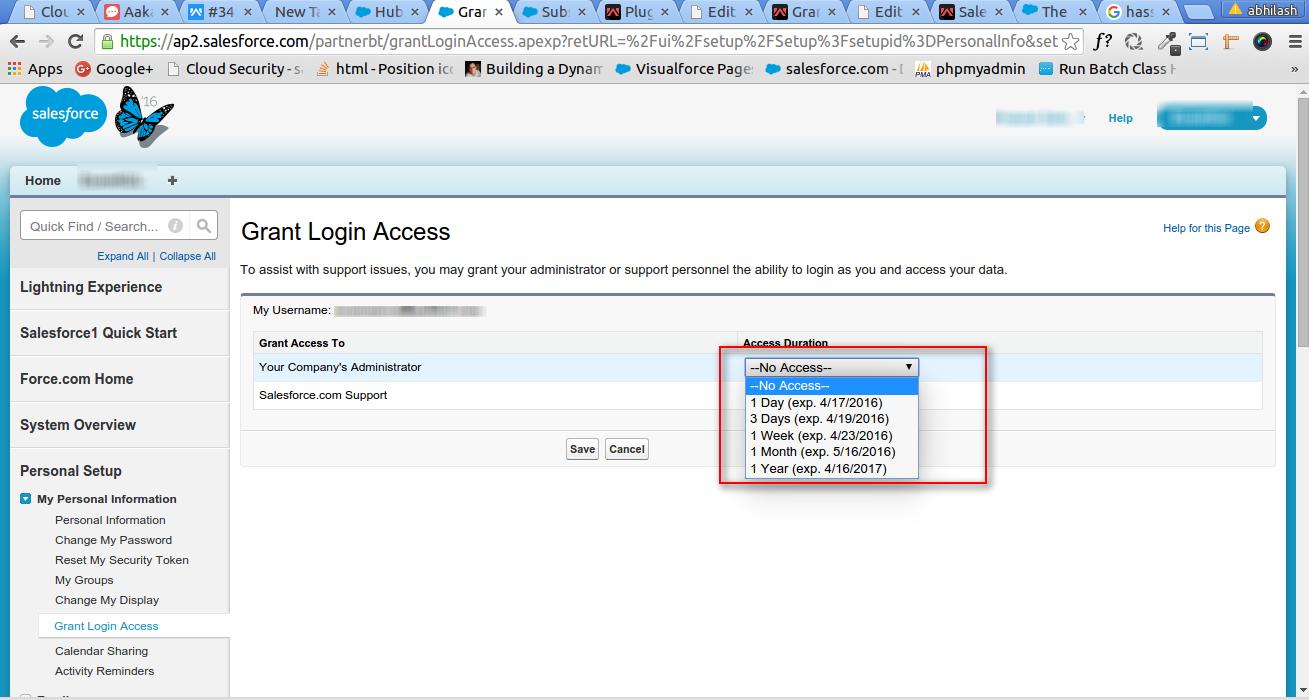
    Screenshot-from-2016-04-16-14-33-19-png-1366×768

    Points to keep in mind while granting access

    1. You can not grant login access if you’re logged in as another individual through their login access. For instance, a System Administrator cannot login as their end user and Grant Login Access to Salesforce Support. If the Admin has the feature “Organization Admins can log in as Any User” privilege, Salesforce Support cannot login as a System Administrator and then login as any User in their Organization. If Support has to access to both the end user and the Admin’s account, both the Administrator and End User has to grant access separately.
    2. You can either grant login access or you can grant a month as an option. It is whatever you are most comfortable with providing. Also once your case has been closed you are encouraged to go back in and set the access back to “No Access”.
    3. You could not grant access to certain organizations if your administrator has implemented restrictions or a packaged application’s license prevents it.
    Categories: Salesforce Implementation
    Tagged: Data Access, Grant Account Login Access, Permission Sets in Salesforce, Salesforce Account, Salesforce Security

    Get listed your company

    Have an innovative Salesforce solution that delivers faster, smarter results?
    Join the Marketplace

    [adinserter block=”16″]

    best salesforce consultants
    best salesforce consultants
    best salesforce consultants
    salesforce consultants

    [adinserter block=”10″]

    salesforce consultants

    [adinserter block=”10″]

    salesforce consultants

    [adinserter block=”10″]

    salesforce consultants

    [adinserter block=”10″]

    salesforce consultants
    salesforce consultants

    [adinserter block=”10″]

    salesforce consultants
    salesforce consultants
    Footer Forcetalks logo

    support@forcetalks.com

    • twitterx

    Quick Links

    Advertise with Us

    Salesforce® Articles

    Dreamforce 2023

    Top Salesforce® Bloggers 2023

    Top Salesforce Consultants

    Get Listed

    Company

    Contact Us

    About Us

    Privacy Policy

    Terms & Conditions

    InsightHub

    Salesforce Blogs

    Salesforce Videos

    Salesforce Groups

    Salesforce Jobs

    © 2026 - Forcetalks ● All Rights Reserved

    Salesforce® is a trademark of Salesforce® Inc. No claim is made to the exclusive right to use “Salesforce”. Any services offered within the Forcetalks website/app are not sponsored or endorsed by Salesforce®.

    Try AuditMyCRM - It is a Salesforce CRM Audit tool which comprehensively scans your Salesforce org and gives you the list of errors or warnings you need to take care of.
    We use cookies to enhance your browsing experience. Please see our privacy policy if you'd like more information on our use of cookies.