
-
How to get Custom field id in Salesforce?
Hi All,
How to get Custom field id in Salesforce?


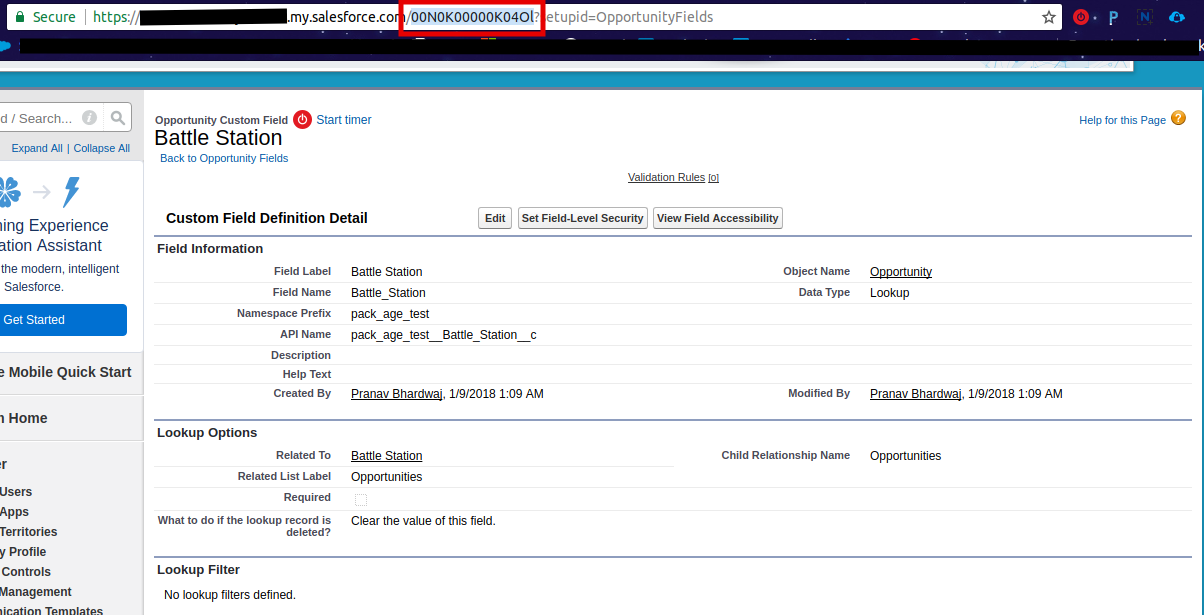
Log In to reply.

Popular Salesforce Blogs

What is the External ID in Salesforce and Data Wizard? | All You Need to Know
In Salesforce, an external ID is a unique identifier for records generated outside of Salesforce. This is a custom field that can be added to…


How High Tech Companies Can Win With Salesforce Marketing Cloud
Frequent and personalized touchpoints have become essentials in High-Tech Industry, with the more and more digital-savvy workforce taking up the roles in decision-making in the…


How can Organizations Benefit From Salesforce Sales Cloud Implementation
Businesses today, irrespective of their scope or size need a feasible platform to pull through the fierce marketplace competition, nurture the existing customers, and acquire…

Popular Salesforce Videos

Salesforce User Experience UX Designer Certification
The Salesforce User Experience (UX) c is designed for individuals who have at least 6 months in UX design and 3–6 months’ experience utilizing UX…


Apex Classes and Apex Triggers in Salesforce
In this video, Salesforce developer Artem will demonstrate real-world applications of both Apex classes and triggers with practical business scenarios. Apex classes and Apex triggers…


Lightning Component Development - Applying Stylesheet, Create Basic Lightning Component
Welcome to Lightning Component Development Sessions. This is the initiative to help Salesforce Community in learning Lightning which we believe is future of Salesforce. Check…
