
-
How can we disable the inline editing of records in Salesforce?
How can we disable the inline editing of records in Salesforce?

Log In to reply.

Popular Salesforce Blogs

Top 10 Things to Know About Salesforce
Administrators/Devs/Consultants are a key piece of any business that has a Salesforce execution, they keep things ticking over just as extending Salesforce to incorporate new…


10 Steps to a Sustainable Salesforce Org
Salesforce is one of the most widely used CRM platforms in the world, enabling organizations to streamline their sales, marketing, and customer service operations. However,…


Batch Apex in Salesforce - Learn About the Advantages and Syntax
Batch class in Salesforce is utilized to run huge positions (think thousands or millions of records!) that would surpass typical handling limits. Utilizing Batch Apex,…

Popular Salesforce Videos

Allies Unite at Dreamforce 2019! Datafam march to trailblazers, Drumrolls!
mid laughter and boisterous conversations at Dreamforest, Datafam - the Tableau workforce - turned all heads with a remarkable entry marked with riotous sounds and…

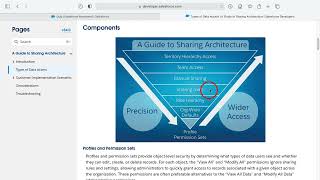
Salesforce Guide to Sharing Architecture
The Salesforce sharing model is an essential element in your organization's ability to provide secure application data access. Therefore, it's crucial to architect your sharing…


Salesforce Marketing Cloud Connector for UiPath
This is a connector for Salesforce Marketing Cloud that allows you to work in the background with SFMC instance. watch this video and let us…
